Greetings,
Discord Guide for Beginners
A Rebel Vibez Workshop Series
Discord is a versatile platform designed for real-time communication through text, video, and voice chat within public and private servers. Founded in 2015 by Jason Citron and Stan Vishnevskiy, the app initially targeted the gaming community but has since expanded to various other interest groups and communities. With its user-friendly interface and customizable features, Discord has gained widespread popularity, boasting over 140 million active users. It offers a range of tools for creating and managing servers, as well as options for direct messaging and group chat. Overall, Discord serves as a hub for diverse communities to connect, communicate, and collaborate in real time.
Stats to Know:
• 150 Million Monthly Active Users
• 19 Million Active Servers Per Week
• 4 Billion Server Conversation minutes Daily
How to Create your Profile
Discord is available for download on mobile and desktop devices, and can also be accessed through a web client on a browser. When creating a profile, users can set a display name and a username, with the display name being the name that appears when sending messages. Once the profile is set up, users can join servers or add friends by accessing the direct messages tab. Discord provides a convenient way to communicate and collaborate with others in various online communities.
More Info:
When creating an account, it is important that you verify within 7 Days
Display and Username Example
Display Name: ✠ Яǝ𝔟𝔢𝔩𝟷𝟷SɪχTTV ✠
Username: rebel11six
Other profile settings include pronouns and an about me section, but if you get Discord Nitro there is even more profile settings to mess with!

Server Rules
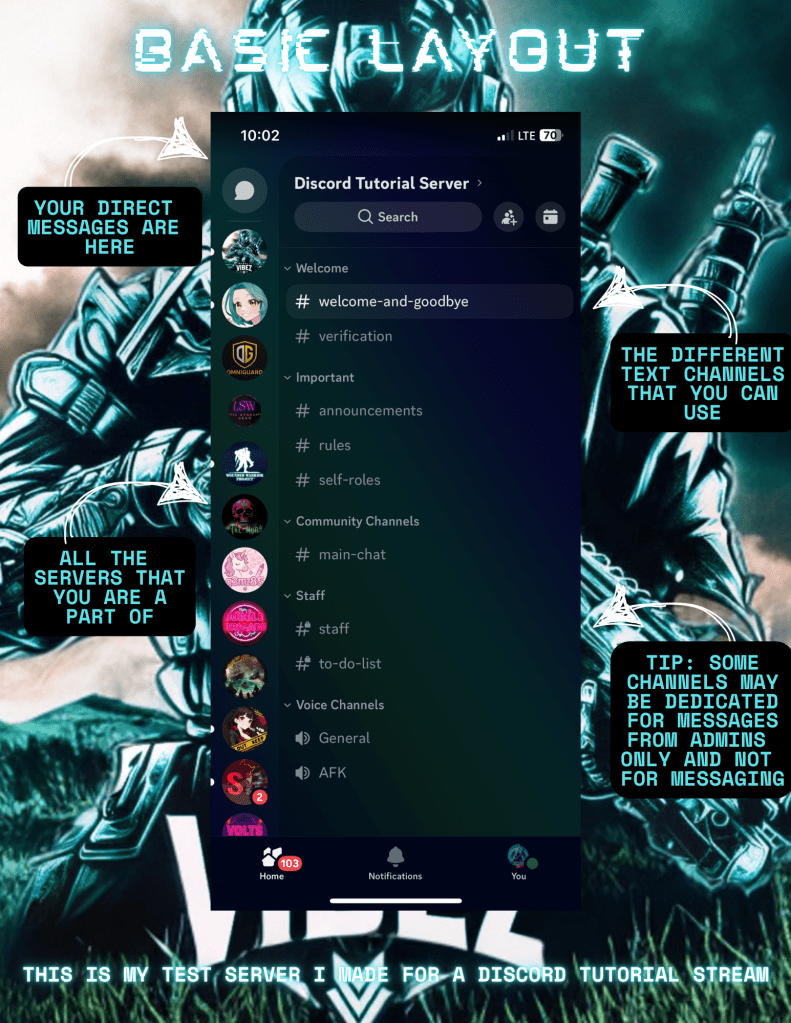
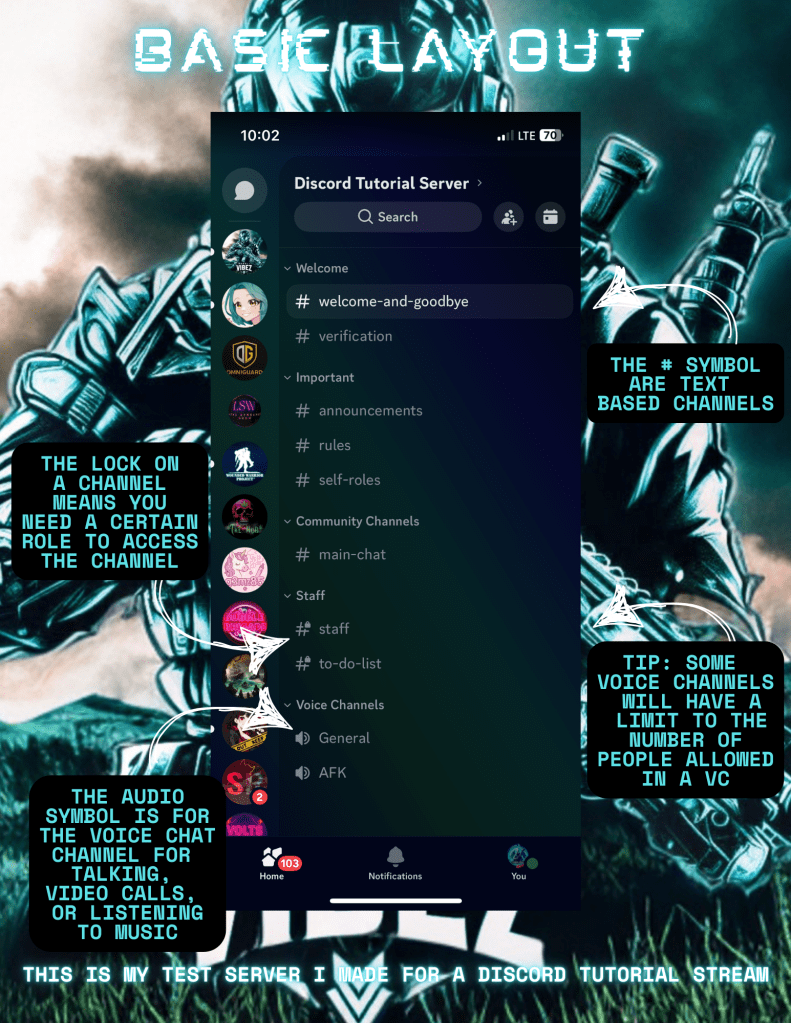
Servers often have dedicated rules that members must follow in order to maintain a safe and inclusive community. It is crucial for new members to carefully review and understand these rules before actively participating in the server. If a new member finds themselves unable to access any of the channels within the server, they should seek out a specific channel that is dedicated to outlining and explaining the server’s rules. In many cases, these channels will include a button, or a reaction button, at the end of the message, which, when clicked, will assign the member a new “role” and grant them access to additional channels within the server.
Here at Rebel Vibez Gaming, we have a rules channel, but we also have a verification channel. The verification channel once you have joined and accepted the rules you hit the reaction button in the verification channel and a password will need to be entered. That password is RVIBE.

Learning about Bots
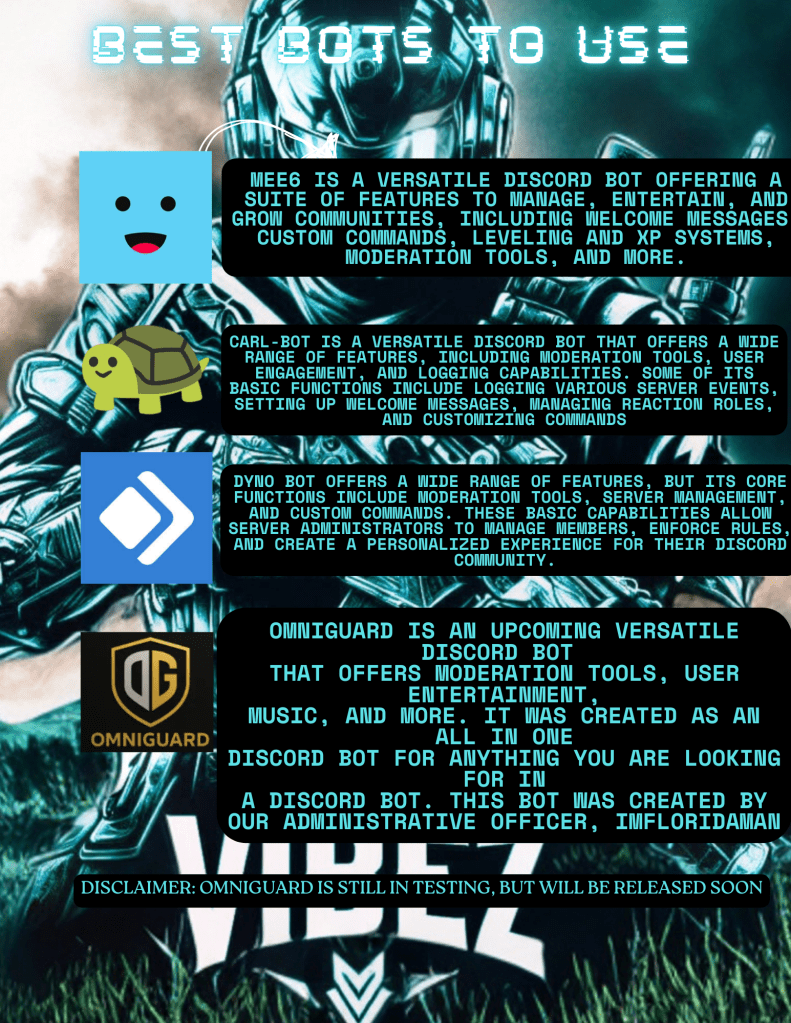
Bots are a useful addition to Discord servers, as they can automate tasks and make managing the server more efficient. They can perform various functions such as moderating interactions, assigning roles, and providing information to members. There are several websites where users can find and add bots to their servers, such as the unofficial Discord bot list website and Top.gg. Some bots even have their own dedicated websites. Since bots are considered “members” of a server, they are usually given their own role with the necessary permissions to carry out their tasks effectively. Overall, bots can enhance the functionality and management of Discord servers.
Most Popular Bots:
Building a Community
Discord is a powerful tool for engaging with communities, whether it be your own or someone else’s. You can make use of various features to keep your community engaged, such as alerting your server when you upload on social media or start a live stream. Hosting private events or contests can also provide added incentive for joining the server. Additionally, interacting one-on-one with community members can help foster a sense of connection and belonging. To ensure a positive and safe environment, it’s important to establish clear and specific server rules that align with your preferences. It’s also important to respect the rules set by other servers, if you are a member of multiple communities. If you are setting up your own server, having a plan in place for moderation is essential to maintaining a healthy community atmosphere. Understanding the features and functionalities of Discord may take some time, so it’s important to be patient and learn as you go. Overall, Discord can be a valuable tool for community engagement and connection.
What are YOUR thoughts on this workshop? Did this answer your questions? What should I cover next in this series? Let me know what you think below!


 Rebel Vibez Gaming
Leave a comment